
Rated 5.0 on the Chrome Web Store
Know in seconds whether a business for sale can pay its loan and pay you.
Deal Analyzer puts cash flow after debt service, debt coverage and the most you could pay on every listing you browse, calculated with your own down payment, rate and term. One click asks the broker for the NDA and CIM or sends the deal to your Google Sheet.
Free for 7 days with no credit card, then $19 a month. Runs in Chrome, Edge, Brave, Dia, Opera and Firefox on desktop. Get it for Firefox
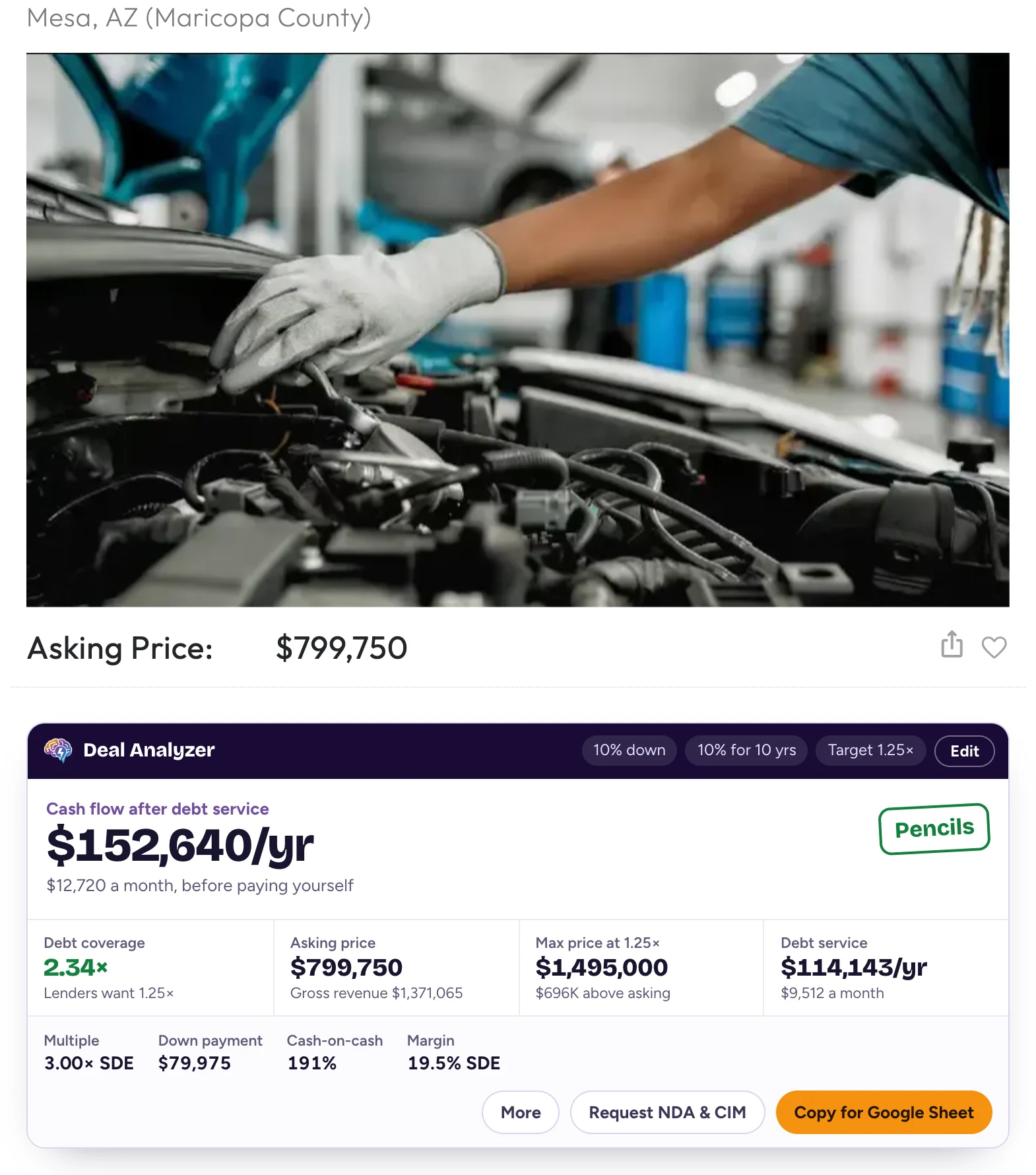
Asking price
$799,750
Cash flow (SDE)
$266,783
 Deal Analyzer10% down10% for 10 yrsTarget 1.25×
Cash flow after debt service
$152,640/yr
$12,720 a month, before paying yourself
- Debt coverage
- 2.34×
- Lenders want 1.25×
- Asking price
- $799,750
- Gross revenue $1,371,065
- Max price at 1.25×
- $1,495,000
- $696K above asking
- Debt service
- $114,143/yr
- $9,512 a month
Works on 16 listing sites
- BizBuySell
- BizQuest
- Transworld
- Sunbelt
- BizScout
- Acquire.com
- BizBen
- BusinessBroker.net
- Vested Business Brokers
- Website Closers
- DealStream
- First Choice Business Brokers
- HedgeStone
- Murphy Business Sales
- We Sell Restaurants
- LINK Business
“Using Deal Analyzer we were able to find a business and close on it.”
We are constantly looking for new deals and Deal Analyzer helps us quickly review each listing's metrics to check for initial alignment. Using Deal Analyzer we were able to find a business and close on it last year. We continue to use the tool as we look at new listings and find it invaluable.
“This makes the BizBuySell user interface so much more efficient to use: It's a time saver. It adds valuable information right on the listing page. And it all happens automagically! Love it. Totally pays for itself. Cannot recommend it enough.”
“This extension has sped up my deal searching — I can quickly see the numbers without having to do any mental math. Great product and easy to use.”
The math brokers leave out, on every listing.
Listings show price and cash flow. Whether the deal works depends on the loan. Deal Analyzer runs that math the moment the page loads.
- Cash flow after debt service
- What's left each year after the loan payments, before you pay yourself, with a Pencils, Tight or Doesn't cover verdict.
- Debt coverage
- Cash flow over the loan payments, against the 1.25× most SBA lenders want. Set your own target and salary.
- Max price
- The most you can pay and still hit your target, so you know where to start the negotiation.
- Missing numbers
- No cash flow listed? See what the deal would need. No price? See the most it's worth to you. Then ask the broker in one click.


Install once. Browse like you already do.
- 1Add Deal Analyzer to Chrome. The 7-day trial starts with no card.
- 2Set your down payment, rate, term and coverage target once in the toolbar popup.
- 3Open any listing on a supported site. The analysis appears right under the asking price.
- 4Request the NDA and CIM, or copy the deal into your Google Sheet pipeline.
Your loan, your calculator, your name on every request.
Click the Deal Analyzer icon in Chrome's toolbar to set your terms once, check an SBA loan on the listing you're viewing, and sign your broker requests.
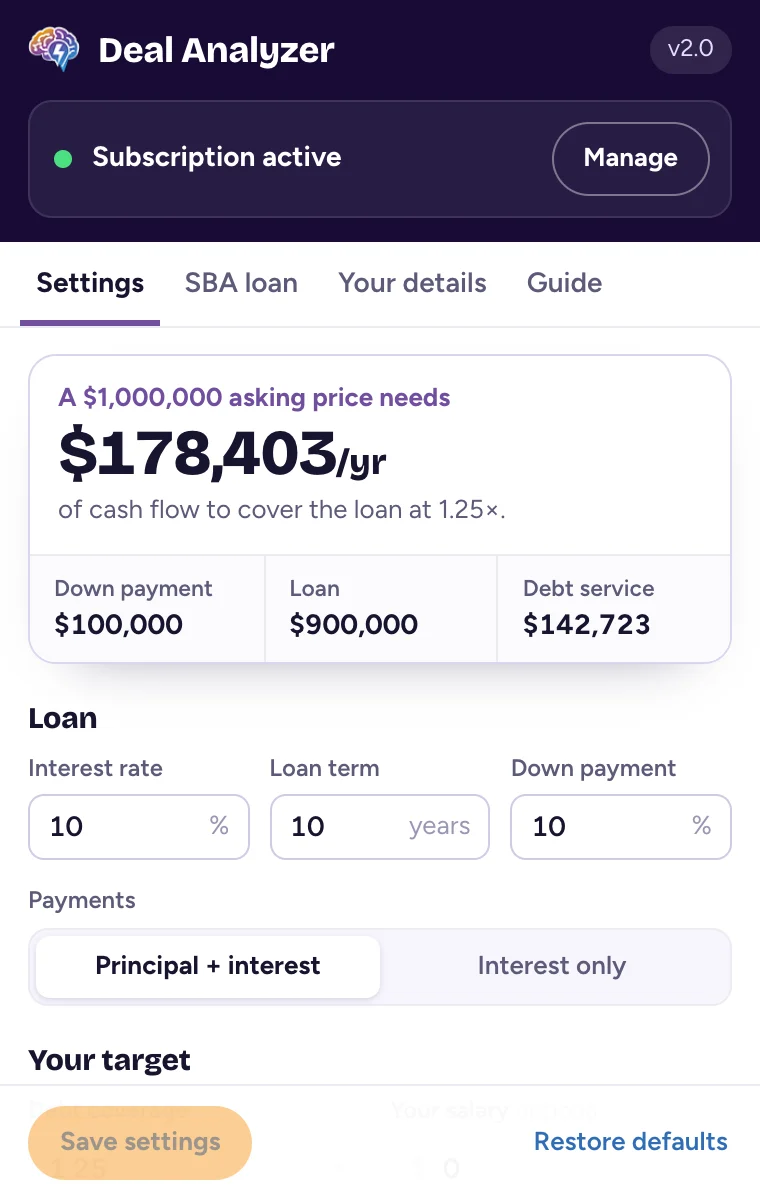
- Settings
- A sample $1M deal shows what your loan terms mean as you type them.
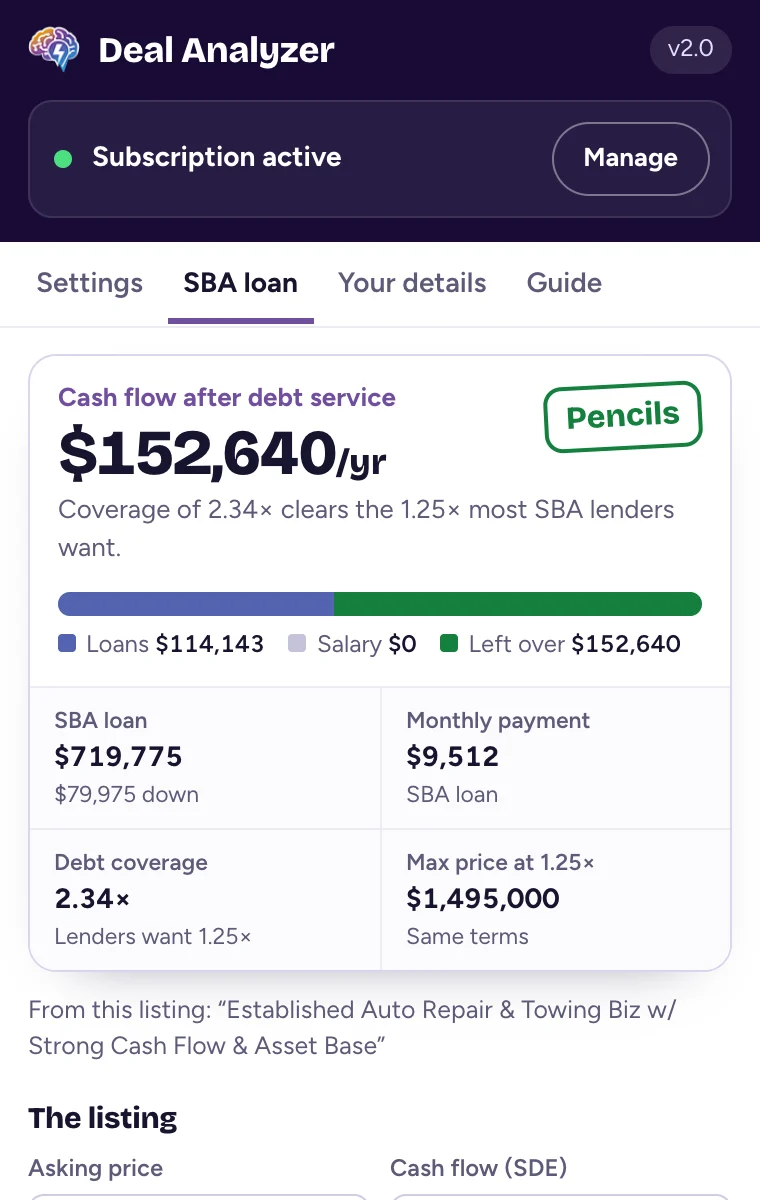
- SBA loan
- Run the listing you're on through an SBA 7(a) loan, with or without a seller note.
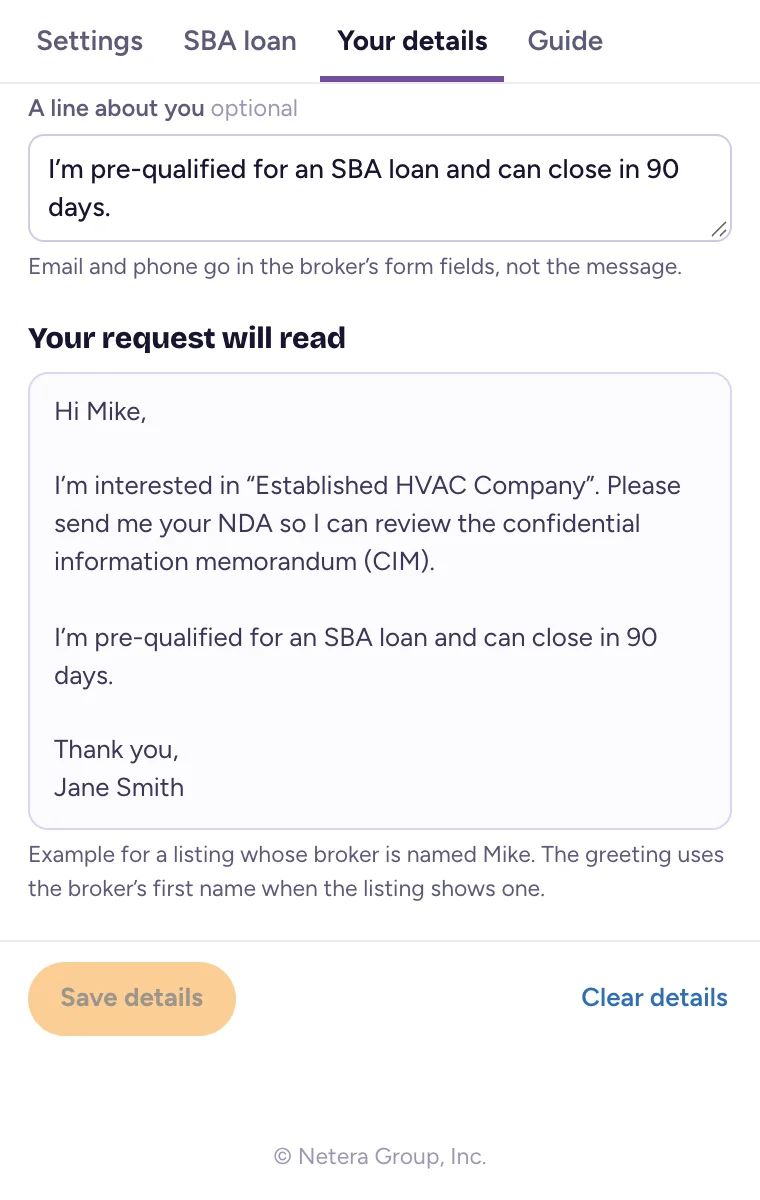
- Your details
- Sign broker requests with your name. Email and phone go in the broker's own form fields.


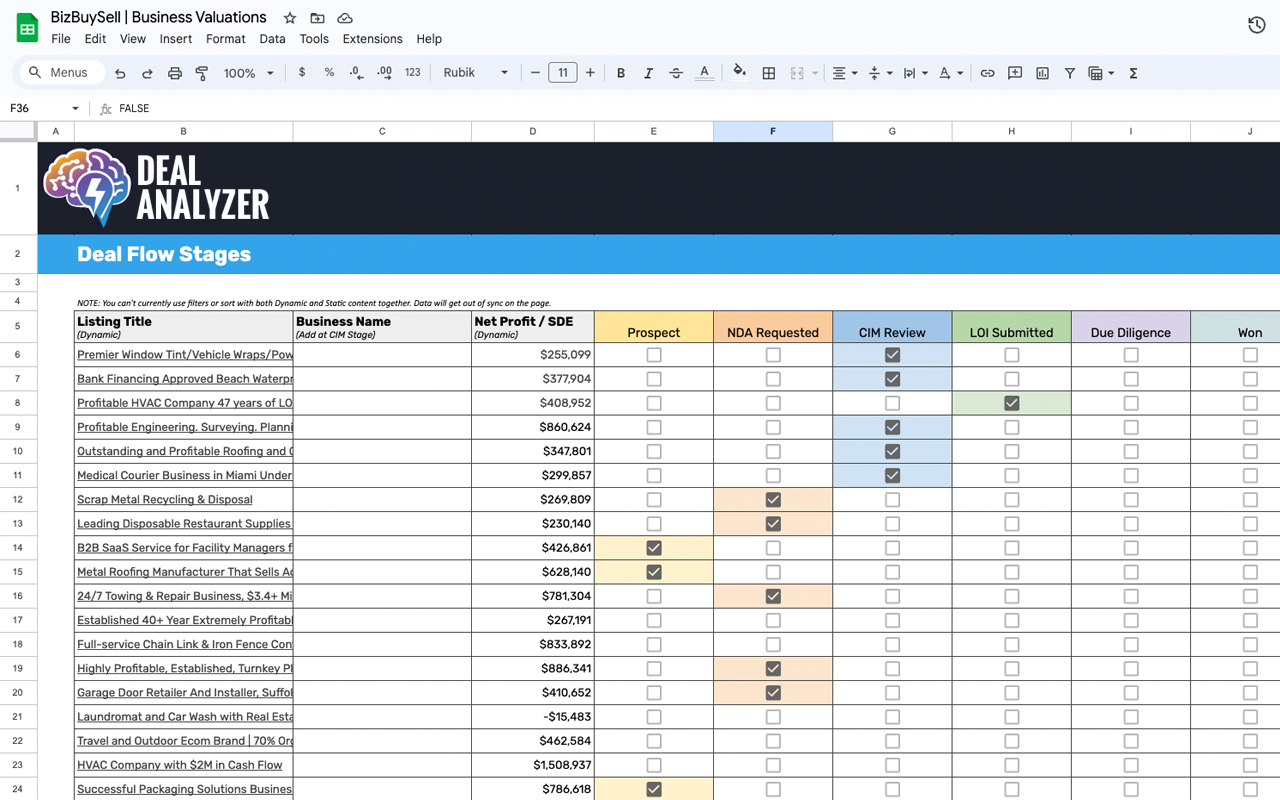

Every deal you like, in one free sheet.
Copy a listing's numbers with one click and paste them into the Deal Analyzer template. Track your pipeline, compare deals side by side, and share them with a partner or your lender.
Copy the Google Sheet templateRun one deal through the SBA math now.
Enter an asking price and cash flow. See the monthly SBA payment, debt coverage and the highest price that still works.
- Asking price
- $850,000
- Monthly payment
- $10,323
- Debt coverage
- 1.45×
- Max price at 1.25×
- $988,000
Every listing site, one price.
$19per month after a 7-day free trial
Or $199 a year, or $497 once for lifetime access.
- No credit card to start the trial
- All 16 supported listing sites
- Your own loan settings on every listing
- NDA & CIM requests in one click
- SBA loan calculator in your toolbar
- One-click export to the Google Sheet pipeline
- Cancel anytime
Questions buyers ask
Which listing sites does it work on?
BizBuySell, BizQuest, Transworld, Sunbelt, BizScout, Acquire.com, BizBen, BusinessBroker.net, Vested Business Brokers, Website Closers, DealStream, First Choice Business Brokers, HedgeStone, Murphy Business Sales, We Sell Restaurants, LINK Business. Open a listing on any of them and the numbers appear on the page.
Which browsers does it work in?
Desktop Chrome, Edge, Brave, Dia and Opera, installed from the Chrome Web Store, and desktop Firefox, installed from Firefox Add-ons. Edge asks you to allow extensions from other stores the first time. It doesn't work in Safari or on phones.
What does it cost?
It's free for 7 days with no credit card. After that it's $19 a month or $199 a year, or $497 once for lifetime access. Cancel anytime.
How do I update my card or cancel?
Use the billing page on this site, or click the Deal Analyzer icon in Chrome's toolbar and choose Manage. Billing runs through ExtensionPay and Stripe.
Can I use my own loan terms?
Yes. Set your down payment, interest rate, loan term, loan type, coverage target and salary in the extension, and every listing is calculated with them.
Can it ask the broker for the NDA and CIM?
Yes. Every listing has a Request NDA & CIM button. It writes a short note asking for the NDA, the CIM and any numbers the listing leaves out, signed with your name. On sites with a broker contact form it fills the form for you to review and send; elsewhere it copies the note. It never sends anything on its own.
Where does my deal data go?
Your settings and contact details stay in your browser. Nothing reaches a broker until you press Send on their site, and the one-click export goes to your own Google Sheet. Deal Analyzer doesn't keep a copy of your deal analysis.
Is this financial or legal advice?
No. The figures are estimates to help you screen listings quickly, and they don't replace your own due diligence. Work with a CPA, an attorney and your lender before you make an offer.